
Introduction
For more than a decade, DAX authors had one option when the same calculation logic was needed in several places: copy and paste it, then hope every copy stayed in sync. Power Query had reusable M functions for years, but DAX had no equivalent until DAX User-Defined Functions (UDFs) arrived. First introduced in preview with the September 2025 Power BI Desktop update, DAX UDFs reached general availability with the June 2026 release, rolling out by default across Power BI Desktop and the Power BI Service.
What Are DAX User-Defined Functions?
A DAX User-Defined Function is a reusable piece of calculation logic that lives inside your semantic model as a first-class object alongside tables, measures, and relationships. Instead of embedding the same expression inside a dozen measures, calculated columns, or visual calculations, you define the logic once, give it a name, and call it anywhere DAX is supported, including from inside other UDFs.

Once added to the model, that function can be called from a measure, a calculated column, or a visual calculation exactly like a native DAX function such as SUM or CALCULATE.
Quick Definition
- A DAX UDF packages parameterized calculation logic into a single, named, reusable model object.
- It behaves like any built-in DAX function once defined it can even call itself or other UDFs.
- It requires database compatibility level 1702 or higher.
Why DAX UDFs Matter for Your Business
For organizations running large semantic models across finance, sales, and operations, DAX UDFs solve four persistent pain points at once:
| Benefit | What It Means in Practice |
| Reusability & consistency | Write a calculation once and reuse it across every measure, column, and visual — no more copy-pasted DAX drifting out of sync. |
| Maintainability | Update business logic in a single place to fix a bug or evolve a rule, and every consumer of that function updates automatically. |
| Safer authoring | Optional type hints and type-check helpers catch mismatched inputs early, reducing runtime errors. |
| First-class governance | UDFs appear under the Functions node in Model Explorer, are tracked as model dependencies, and stay in sync automatically when tables, columns, or measures are renamed. |
How to Create and Use a DAX UDF
Understand Parameter Modes: val vs expr
The most important and most misunderstood concept in DAX UDFs is how parameters are passed:
- val (eager evaluation): the argument is resolved once, before the function body runs, and then behaves like a fixed value inside the function.
- expr (lazy evaluation): the argument is passed in as an unevaluated expression and is only resolved when it's actually used inside the function body — which matters for functions that need to react to filter context changes.
Where You Can Author a UDF
Power BI gives you three equivalent authoring surfaces, so teams can pick whichever fits their workflow:
- DAX Query View (DQV) use the Quick queries context menu (Evaluate, Define and evaluate, Define all functions) to build and test functions fast.
- TMDL View author and edit functions as code; drag and drop them into the canvas or use Script TMDL. Functions are stored in a functions.tmdl file inside the model definition, so they're fully Git-trackable.
- Model View / Model Explorer right-click New function to scaffold one, then edit the expression directly in the formula bar.
Calling a UDF
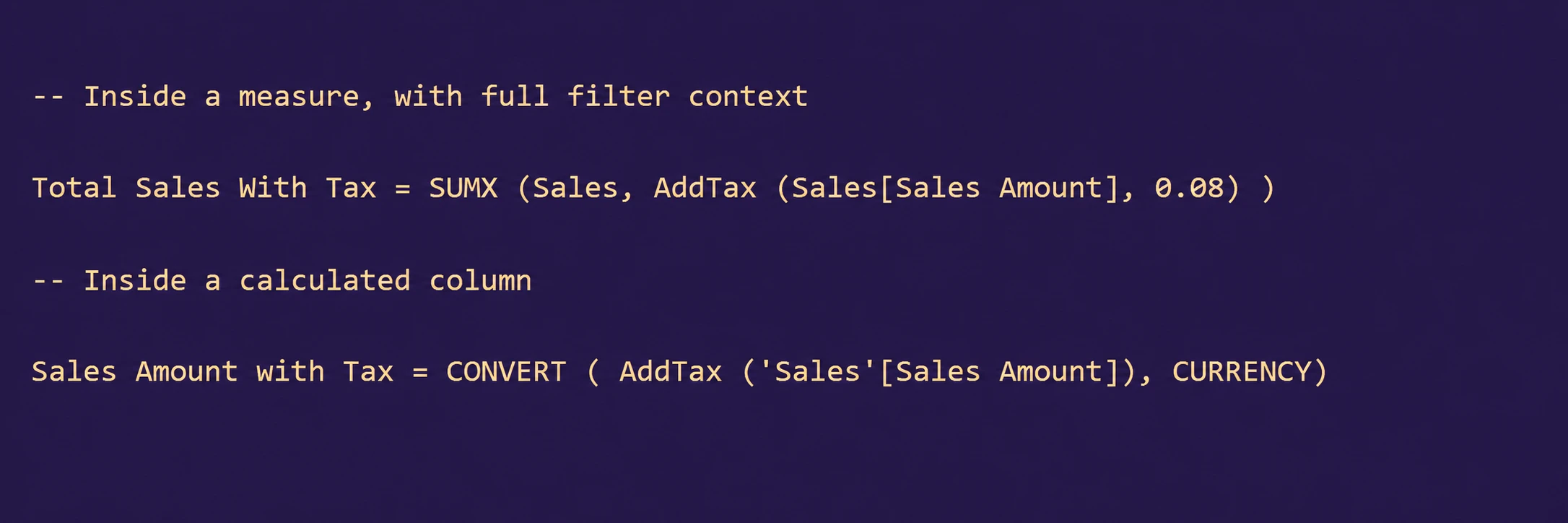
Once a function is added to the model, you can call it from anywhere DAX is valid:
Real-World Use Cases for DAX UDFs
| Scenario | How a UDF Helps |
| Tax, discount, or currency conversion logic | Centralize the formula once instead of repeating it across dozens of financial measures. |
| Standardized date/period calculations | Wrap common time-intelligence patterns (YTD, rolling 12 months) into a single callable function. |
| Reusable business rules across teams | Package compliance or KPI logic so every analyst references the same governed definition. |
| Calculation-group style transformations | In some cases, UDFs can complement or simplify logic that previously required calculation groups. |
| Complex nested expressions | Break large, hard-to-read DAX formulas into smaller, named, testable building blocks. |
Frequently Asked Questions
What is the difference between val and expr parameter modes?
val evaluates the argument once, upfront, and treats it as a fixed value inside the function. expr passes the argument as an unevaluated expression that is only resolved when used inside the function, allowing it to respond to filter context at the point of use.
Do DAX UDFs replace calculation groups?
Not entirely they solve different problems. UDFs are best for packaging reusable calculation logic, while calculation groups remain the tool for applying the same calculation pattern across many existing measures. In practice, many models benefit from using both together.
Can a UDF call another UDF?
Yes. UDFs can call other UDFs, which makes it possible to build small, composable functions and combine them into larger business logic.
Where are UDFs stored if I use source control?
When working with a Power BI Project (.pbip), UDFs are stored in a functions.tmdl file inside the model definition folder, making them fully trackable in Git alongside the rest of your model.
Conclusion
DAX User-Defined Functions close one of the last major gaps between DAX and mature programming languages: the ability to define logic once and reuse it everywhere, safely and consistently. For any organization maintaining large, shared semantic models, adopting UDFs is a straightforward way to reduce duplicated logic, cut down on maintenance overhead, and make governance easier to enforce.