Organizations manage hundreds to thousands of documents daily, ranging from invoices and contracts to purchase orders, applications, and regulatory documentation. Manual document processing not only consumes valuable employee time but also increases the risk of errors, delays, and operational inefficiencies.
AI Document Processing Automation is transforming how organizations manage document-heavy workflows by combining OCR, AI, NLP, Machine Learning, and Large Language Models (LLMs) to automate data extraction, validation, classification, and workflow approvals.
What Is AI Document Processing Automation?
AI Document Processing Automation uses advanced artificial intelligence technologies to automatically read, understand, extract, validate, and process information from business documents with minimal human intervention.
Unlike traditional OCR systems that only convert scanned documents into readable text, intelligent document processing understands context, identifies key information, validates data, and routes documents through automated business workflows.
How Al Document Processing Works?
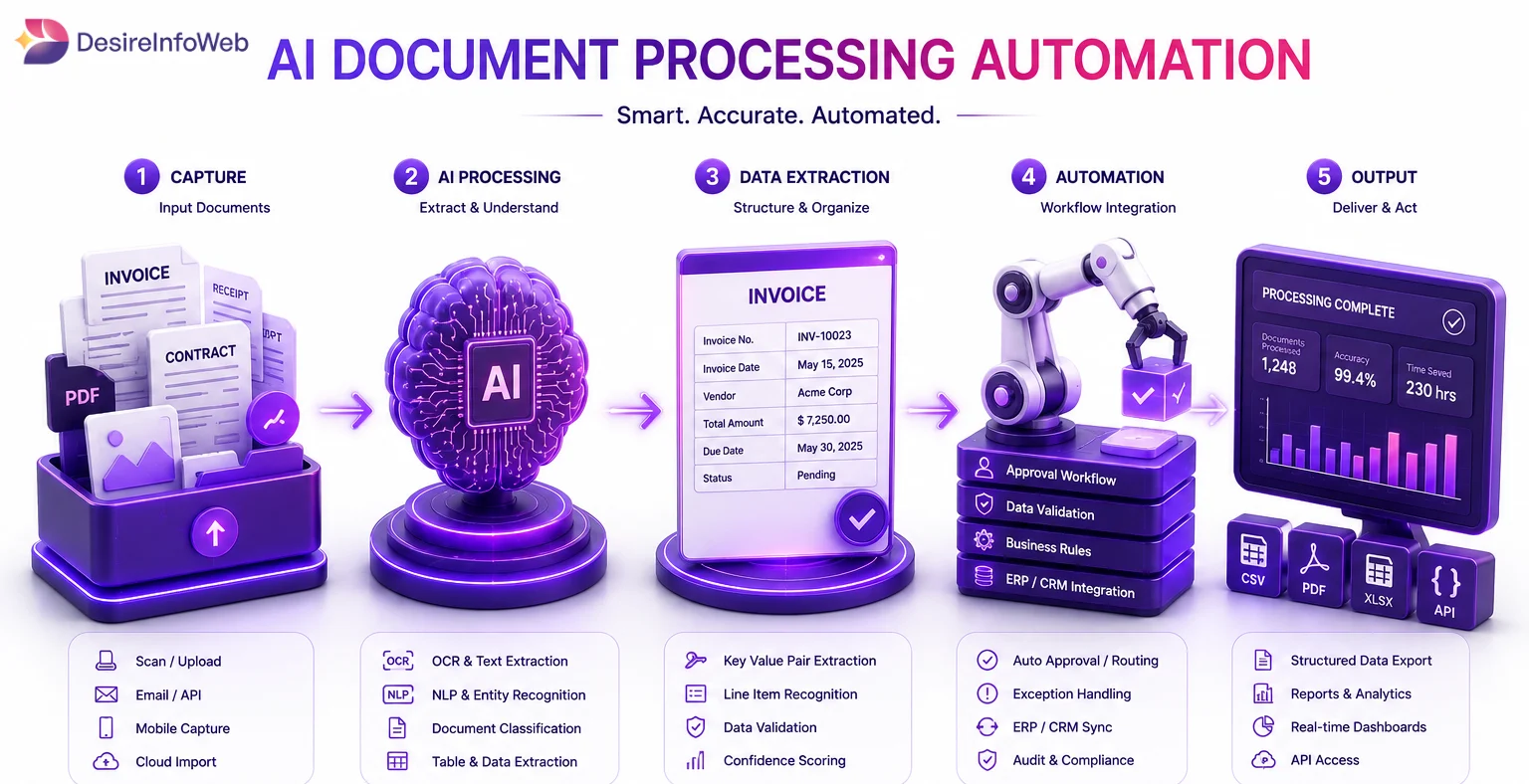
Modern AI-powered document processing functions as an intelligent digital workflow that automatically captures, interprets, organizes, and manages business documents. Rather than depending on manual data entry and document handling, AI technologies combine Optical Character Recognition (OCR), Machine Learning (ML), Natural Language Processing (NLP), and workflow automation to extract, analyze, and process information efficiently. This enables organizations to handle large volumes of documents more quickly, reduce human errors, and improve overall data accuracy.
Here's how the complete workflow usually works.
Step 1. Document Upload and Pre-Processing
These documents can include:
PDFs
Scanned invoices
Contracts
Forms
Receipts
Images or handwritten files
Step 2. Al-Based Document Classification
After text extraction, Al models classify the document automatically.
An invoice
A contract
A purchase order
A customer form
A medical record
An insurance claim
AI-driven document classification systems evaluate content, formatting, document structure, and contextual patterns to accurately determine the type of each document. By intelligently categorizing files as they enter the system, organizations can automate document organization and direct information to the appropriate business processes without requiring manual sorting or intervention.
Step 3. Structured Data Extraction
The system extracts important fields such as:
Invoice numbers
Vendor details
Dates
Tax amounts
Payment terms
Customer information
Step 4. Al Validation and Confidence Scoring
Not every extracted value is always 100% accurate.
For example:
High confidence data moves forward automatically.
Low confidence fields are flagged for human review.
This creates a balance between automation and accuracy.
Validation workflows can also check:
Missing values
Duplicate invoices
Incorrect formats
Mismatched purchase orders
Compliance issues
Step 5. Workflow Automation and Integration
Al document workflows can integrate with:
ERP systems
CRM platforms
Accounting software
HR systems
Compliance platforms
For example, information extracted from invoices can be seamlessly transferred into financial systems, initiate approval processes, and send automated notifications to relevant stakeholders. This eliminates repetitive manual tasks and ensures business operations move forward without unnecessary delays.
The true value of AI Document Processing Automation lies in its ability to streamline high-volume document workflows. By automating document handling and data-driven processes, organizations can reduce administrative workloads, accelerate processing times, improve operational efficiency, and make faster, more informed business decisions.
Common Business Challenges Solved by AI Document Processing
Many organizations still rely on manual document handling, resulting in:
Slow approval cycles
Data entry errors
Duplicate document processing
Compliance risks
Reduced productivity
Higher operational costs
Delayed customer service
AI-powered automation eliminates these bottlenecks by processing documents faster and more accurately.
Key Features of AI Document Processing Solutions
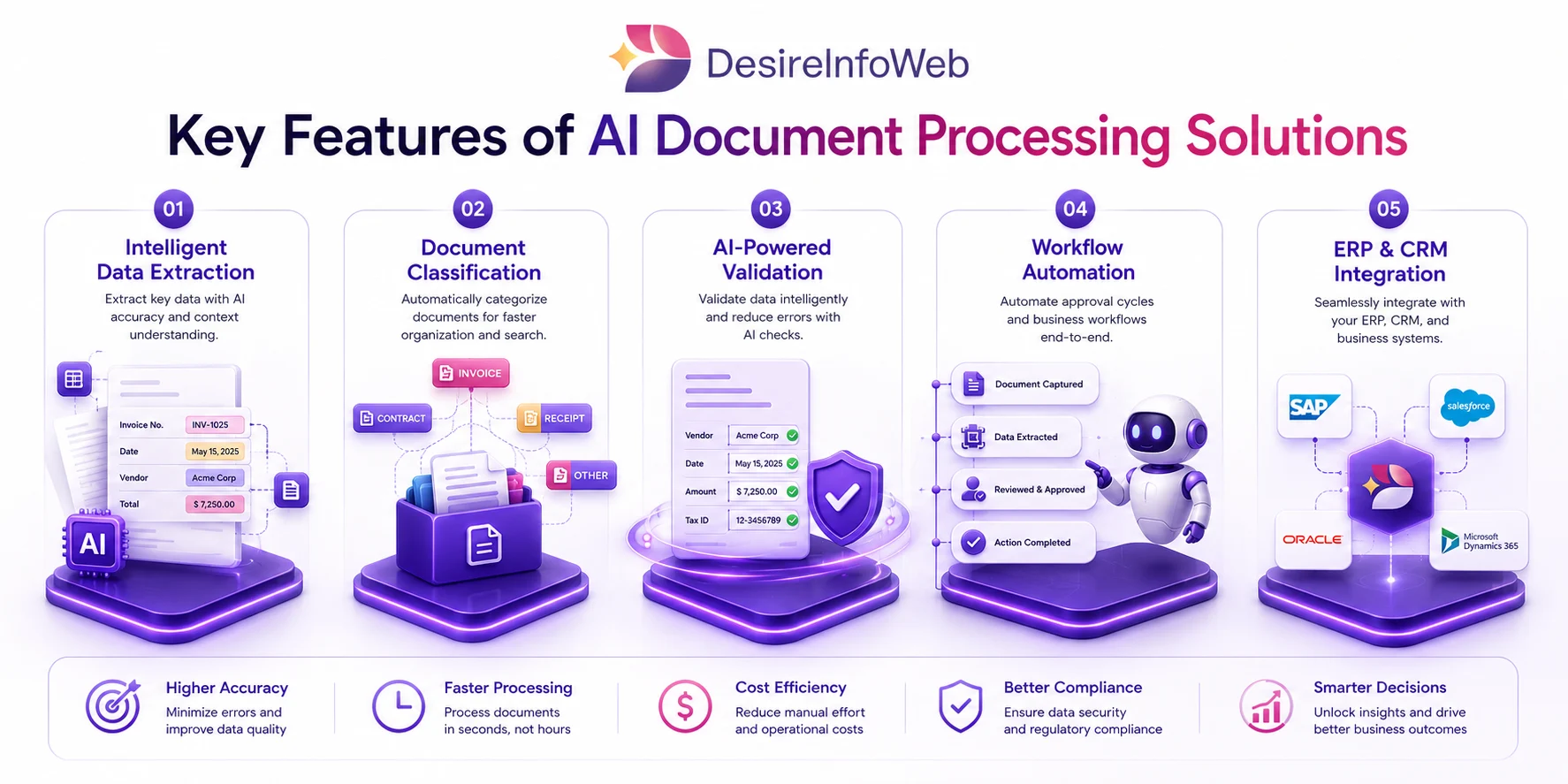
Intelligent Data Extraction
Automatically extract information from:
Invoices
Contracts
Purchase Orders
KYC Documents
Insurance Claims
Financial Reports
Employee Forms
Document Classification
Automatically identify and categorize documents without manual sorting.
AI-Powered Validation
Verify extracted information and flag inconsistencies before data enters business systems.
Workflow Automation
Trigger approvals, notifications, escalations, and business processes automatically.
ERP & CRM Integration
Seamlessly connect with business systems such as:
Microsoft Dynamics 365
SAP
Salesforce
Oracle
SharePoint
Power Platform
Custom ERP Solutions
How AI Document Automation Improves Business Efficiency
Organizations implementing AI document processing can achieve:
Reduced manual workload
Faster invoice and contract processing
Improved data accuracy
Enhanced compliance management
Faster approval workflows
Real-time ERP and CRM updates
Lower operational costs
Improved business scalability
AI-Powered Invoice Automation
Invoice automation is among the most valuable applications of intelligent document processing.
AI systems can automatically:
Capture invoice details
Extract vendor information
Validate purchase orders
Detect duplicate invoices
Identify unusual payment amounts
Route invoices for approval
Update accounting systems automatically
Why Businesses Are Investing in AI Document Processing Solutions
Modern businesses generate enormous amounts of data trapped inside PDFs, forms, emails, invoices, and contracts. AI-powered document automation unlocks this data and transforms it into actionable business intelligence.
By leveraging OCR, NLP, Machine Learning, Computer Vision, and LLM technologies, businesses can automate repetitive tasks, improve decision-making, and create scalable digital workflows.
Looking for AI Document Processing Automation Services?
If your organization is struggling with manual document workflows, invoice approvals, contract processing, or data extraction challenges, implementing a custom AI Document Processing Solution can help reduce costs, improve productivity, and accelerate Digital Transformation.
Our AI Automation Experts Can Help You:
✔ Intelligent Document Processing (IDP)
✔ AI-Powered Invoice Automation
✔ OCR & Data Extraction Solutions
✔ ERP & CRM Integration
✔ Microsoft Power Platform Automation
✔ AI Builder Implementation
✔ Workflow Automation Development
✔ Custom AI Software Development
Conclusion
Modern AI-powered document processing platforms go beyond simple text extraction. They can interpret document content, automate decision-based workflows, integrate seamlessly with ERP and CRM systems, support regulatory compliance requirements, and provide greater visibility into business operations.
This growing demand for efficiency is driving the adoption of AI document processing automation as a key component of digital transformation initiatives. By combining technologies such as Optical Character Recognition (OCR), Natural Language Processing (NLP), Machine Learning (ML), Large Language Models (LLMs), and workflow automation, businesses can streamline the processing of invoices, contracts, forms, and other document-intensive processes.